
Scheduling ML Workloads on Kubernetes
On Gang Scheduling, Bin Packing, Consolidation, and the Like

The kube-scheduler is Kubernetes’ default scheduler, responsible for assigning newly created pods to suitable nodes. Scheduling happens in two phases: filtering and scoring. During the filtering phase, the scheduler evaluates hard requirements, including resource availability (CPU, memory, GPUs), taints and tolerations, required affinity rules, and topology constraints with DoNotSchedule settings. In the scoring phase, the scheduler ranks nodes based on soft constraints, such as preferred affinities, topology spread constraints with ScheduleAnyway settings, and other weighted preferences.
The default scheduler is quite sophisticated, with features that have matured over long time (for example, topology spread reached GA on Aug 26, 2020). However, it was designed for scale-out web workloads with elastic capacity and mostly independent pods. ML workloads differ: accelerators are scarce, placement/topology matters, jobs often span multiple nodes, and training cannot begin until all pods are scheduled. As ML use on Kubernetes expanded, the need for specialized ML-aware schedulers increased.
KAI-Scheduler
There are quite a few Kubernetes schedulers that try to address ML workloads, including Volcano, Apache YuniKorn, and Kueue. In this article, we will cover one of the newer schedulers - NVIDIA’s KAI-Scheduler (previously run:ai), though the concepts it addresses are common across schedulers.
Gang-Scheduling
Gang-scheduling is a scheduler feature that treats a set of related pods as a group and only schedules them when all can be placed at once. It’s especially useful for large model training jobs, where a single missing worker can stall the entire run. Without gang-scheduling, partially scheduled jobs leave remaining pods pending, which can also block smaller, otherwise schedulable trainings from starting.
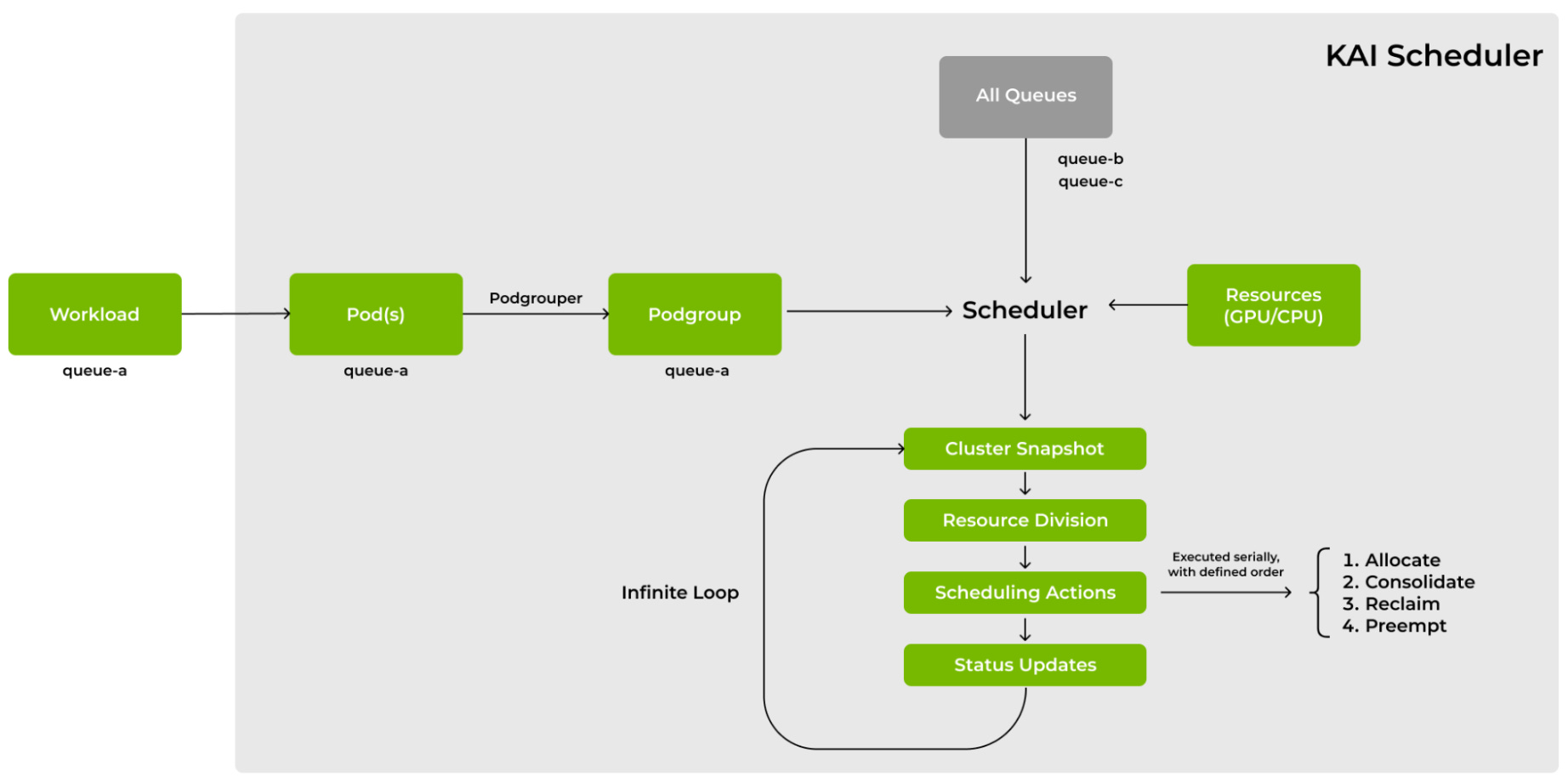
In KAI-scheduler, gang-scheduling is driven by the pod-grouper. At a high level, the pod-grouper watches pod creation events and, for each pod, follows its ownerReferences up to the top-level owner. All pods that share the same top-level owner are treated as a single atomic scheduling unit. As an example, in a typical RayJob deployment it would look like:
ray-head-<id-1> → ownerReferences → RayCluster-<id-0>
ray-worker-group-a-<id-2> → ownerReferences → RayCluster-<id-0>
ray-worker-group-b-<id-3> → ownerReferences → RayCluster-<id-0>
Since they share the same RayCluster as owner, they form a single pod group and are scheduled atomically.
Bin-Packing
Bin-packing is a scheduling strategy that fills nodes with higher existing allocation first, before placing pods elsewhere. For ML workloads, this reduces GPU fragmentation, allowing the cluster to run larger topologies, for example, jobs that need 8 GPUs on a single node. By consolidating work onto fewer nodes, it keeps other nodes completely free, improving autoscaling and lowering infrastructure costs while preserving the contiguous per-node resources those large jobs require.
KAI-Scheduler implements bin-packing by simply sorting the topology tree during job filtering. At each topology level, it orders instances by allocatable pod slots in ascending order (fewest first), so tighter domains are attempted before larger ones.
Consolidation
At its core, consolidation is defragmentation of the cluster’s resources. While similar to bin-packing, it focuses on already running workloads and attempts to reallocate them to reduce fragmentation. Consolidation only applies to targets that are preemptible (restart tolerant).
KAI-Scheduler runs a consolidation phase immediately after allocation. If a pending podgroup cannot be placed due to fragmentation, it inspects running workloads and computes a minimal, legal set of relocations, moving existing jobs to other nodes. The goal is to create the contiguous free resources required by the waiting podgroup without violating scheduling policies. When a suitable plan is found, the scheduler temporarily evicts and rebinds the affected pods, frees the necessary block, and immediately allocates the waiting group. If no viable consolidation exists, KAI-Scheduler escalates to resource reclaiming or, within the same queue, preemption to maintain fairness (more on queues and fairness later).
Workload Priorities
For the most part, priorities are straightforward: higher-priority workloads receive higher scores during the scoring phase and are scheduled sooner. However, an important detail exists regarding KAI-Scheduler’s implementation. Priority determines preemptibility, which is necessary for operations like consolidation. Specifically, priority values below 100 are considered preemptible, while values of 100 or above are non-preemptible. For inference workloads, it is advisable to use values of 100 or higher.
GPU-Sharing
KAI-Scheduler offers a unique capability among ML schedulers: it lets multiple pods share the same GPU device. Pods request partial GPUs via annotations, either gpu-fraction (for example, 0.5 for up to half the device) or gpu-memory in MiB (for example, 2000). If the combined requests fit, KAI co-locates those pods on the same GPU. Note: KAI doesn’t enforce or isolate GPU memory, so workloads must manage it themselves.
GPU sharing is implemented through reservation pods created by KAI’s binder component. When a pod requests fractional GPU resources, the binder deploys a reservation pod in a dedicated namespace that claims the full GPU (nvidia.com/gpu: 1). This reservation pod, running with the NVIDIA RuntimeClass for NVML access, queries the GPU’s UUID and reports it back via annotations. KAI then uses this information to assign the correct physical device to user pods.
Scheduling Queues
Scheduling queues are one of the core components of KAI-Scheduler (like the previously mentioned binder and podgroupper) and they nicely tie together the concepts mentioned above. Queues have four fields: quota (baseline guaranteed resources), over-quota weight (weight for distributing surplus resources beyond quota), limit (hard cap on maximum consumption), and priority (scheduling order across queues). Queues can be organized hierarchically in parent–child relationships, allowing organizations to mirror team structures and enforce fairness at multiple levels.
At the start of each scheduling cycle, the scheduler snapshots the cluster and computes fair share across the hierarchical queue structure using a two-phase algorithm: first it allocates quota resources to all queues, then it sorts queues by priority and distributes remaining resources based on over-quota weights within each priority level, repeating this recursively across the hierarchy. The webhookmanager validates queue specifications and enforces constraints, and the scheduler cache tracks each queue’s current allocation against its fair share. The scheduler then executes four actions in sequence: allocation, consolidation, reclamation, and preemption, aligning current allocations with the optimal state. When a queue exceeds its fair share, KAI can reclaim resources by evicting workloads and redistributing capacity to under-allocated queues, ensuring continuous fairness.
KAI-Scheduler in Practice
From a user’s point of view, using KAI-Scheduler is straightforward. For installation, it provides its own Helm chart (prerequisite: the NVIDIA GPU Operator is already deployed in the cluster). After installation, one has to create queues:
# https://github.com/NVIDIA/KAI-Scheduler/blob/main/docs/queues/README.md#basic-queue

apiVersion: scheduling.run.ai/v2alpha2
kind: Queue
metadata:
  name: research-team
spec:
  displayName: "Research Team"
  resources:
    cpu:
      quota: 1000
      limit: 2000
    gpu:
      quota: 1
      limit: 2
Then reference these queues and the KAI-Scheduler in your workloads. For example, with RayJobs:
apiVersion: ray.io/v1
kind: RayJob
metadata:
  labels:
    # specify kai-scheduler queue
    “kai.scheduler/queue”: “research-team”
    # optional: specify kai-scheduler partition
    “kai.scheduler/nodepool”: “gpu-h200”
spec:
  rayClusterSpec:
    headGroupSpec:
      template:
        spec:
          # specify kai-scheduler instead of the default k8s scheduler
          schedulerName: “kai-scheduler”
          # optional: specify PriorityClass
          priorityClassName: “train”

    workerGroupSpecs:
      - groupName: workers
        template:
          spec:
            # specify kai-scheduler instead of the default k8s scheduler
            schedulerName: “kai-scheduler”
            # optional: specify PriorityClass
            priorityClassName: “train”
And that’s pretty much it. Now go pack some bins.